
Enterprise data engineering teams choosing a data stack keep circling the same question: Databricks or Snowflake? The answer shapes more than a tool choice – it affects how fast AI initiatives reach production, how much engineering time goes to maintenance instead of building, and what the platform actually costs once real workloads hit it.
This comparison is built from hands-on implementation work on both platforms: production systems, migrations between them, and the misconfigurations that turn a sound platform choice into an expensive one.
The calculus behind this decision has shifted, and three changes matter most for anyone making it now:
- Lock-in matters less. Both platforms support the same open table formats now, so the choice rests more on compute model and governance than on which vendor “owns” your data format.
- Governance carries more weight. The EU AI Act is turning AI oversight into a compliance requirement, so a platform’s governance model is now an audit question, not just an operational preference.
- The field has a third player. Microsoft Fabric has matured enough that many enterprises need to weigh it alongside Databricks and Snowflake, not just choose between two.
On top of all that, a lot of organizations are still running on a platform decision made three or four years ago that no longer fits the AI workloads they’re building today — which is exactly why this comparison exists. Getting the decision right protects budget and time to market; getting it wrong turns into a migration measured in months.
Key Takeaways
- For a SQL-first team applying AI to structured business data, Snowflake reaches production faster with less operational overhead.
- For teams training custom models, processing large volumes of unstructured data, or building AI as a product feature, Databricks provides the control that’s eventually needed.
- Open table formats on both platforms have reduced lock-in. The choice now rests on compute model, team skills, and governance.
- Configuration drives cost as much as platform choice: fixing a misconfigured Databricks environment cut one retailer’s projected annual spend by 70%.
- Unity Catalog’s model- and feature-level governance is currently more mature than Snowflake’s for AI traceability requirements like the EU AI Act.
- Many enterprises run both: Databricks for data engineering and model training, Snowflake for serving data to business users.
Here’s the detailed breakdown.
Quick Comparison
| FEATURE CATEGORY | SNOWFLAKE | DATABRICKS |
|---|---|---|
| Core architecture | Managed cloud data warehouse (SaaS) | Open lakehouse (PaaS) |
| Primary language | SQL (Python via Snowpark) | Python/Scala/SQL (Spark) |
| GenAI model access | Cortex — serverless access to Llama, Mistral, Arctic, and partner models | Mosaic AI — model serving and fine-tuning for open and custom models |
| RAG implementation | Cortex Search — managed vector search, quick setup | Vector Search — integrated with Unity Catalog, tunable |
| Data governance | Horizon — RBAC, object-level security | Unity Catalog — lineage, model and feature governance |
| Cost model | Credits — predictable, auto-suspend, premium pricing | DBUs — efficient for batch/scale, spot instance savings |
| Open table formats | Iceberg via Polaris Catalog | Delta Lake native; Iceberg via UniForm |
| Business user AI | Cortex Analyst / Snowflake Intelligence — text-to-SQL, natural language BI | Genie — AI/BI assistant with explainable SQL |
| Ingestion / ETL | Snowpipe, Openflow | Lakeflow — low-code ingestion and transformation |
Why Snowflake and Databricks Feel So Different
Before getting into architecture diagrams, it’s worth understanding why these two platforms make such different trade-offs by default. It comes down to who built them and what problem they were solving.
Snowflake: Built for Analysts and Business Teams
Snowflake was founded in 2012 by Benoît Dageville, Thierry Cruanes, and Marcin Żukowski. Dageville and Cruanes came out of Oracle, frustrated by rigid architectures that scaled poorly and choked under concurrency.
The founding goal was an enterprise-ready data warehouse built for the cloud from the ground up, not a legacy system retrofitted onto cloud infrastructure.
That DNA still shows up in every product decision:
- Enterprise-first, RDBMS-based design. SQL is the primary interface, which means analysts and business teams can adopt AI capabilities without retooling their skill set.
- Product-led simplicity. Snowflake deliberately hides tuning parameters and architectural choices in favor of predictable behavior. There’s less for a team to get wrong, and less for them to optimize.
- Fully managed SaaS. No servers to provision, no indexes to tune, no clusters to maintain. When we deploy on Snowflake, our clients’ DBAs spend their time on schema design and cost governance, not infrastructure babysitting.
- Separation of storage and compute. Independent scaling of analytics and AI workloads without one starving the other.
- A tightly controlled execution layer. Snowflake owns the storage format, the query optimizer, and the execution engine. That control is what makes performance predictable — and it’s the trade-off critics point to when they talk about lock-in.
Databricks: Built by Engineers, for Engineers
Databricks was founded a year later, in 2013, by Ali Ghodsi, Matei Zaharia, and Ion Stoica out of UC Berkeley’s AMPLab – the same team that created Apache Spark.
Where Snowflake optimized for structured data and SQL, Databricks set out to handle the classic “three Vs” of big data: volume, velocity, and variety, for data engineers and data scientists working with logs, images, and sensor streams that don’t fit neatly into rows and columns.
From day one, Databricks was built around the data lake – plain files sitting in the customer’s own cloud storage, not locked into Databricks.
The problem with that approach, historically, is that without any governance or reliability guarantees, data lakes tend to turn into a mess of files nobody trusts – often called a “data swamp.”
Databricks’ fix was the Lakehouse: it added a layer called Delta Lake on top of the raw files, which brings warehouse-like reliability (proper transactions, no half-written or duplicate data) to that open storage, without giving up the openness.
Architecture: How They’re Built and Why It Matters
For a business leader, the underlying architecture matters because it dictates cost, speed, and what future AI projects are actually feasible.
Snowflake’s multi-cluster architecture lets separate compute clusters hit the same data without contention – useful when you’re serving BI dashboards and AI inference simultaneously without one starving the other.
Databricks’ Photon engine (a vectorized C++ rewrite of the Spark execution layer) closes most of the historical performance gap with warehouses, which is why “Databricks is slow for BI” stopped being a fair criticism a couple of years ago.
Open Formats: The Real Competitive Shift
Previously, the format war was clean: Snowflake meant proprietary storage, Databricks meant open Delta Lake. That’s no longer true.
Snowflake has pushed hard into Apache Iceberg through Polaris Catalog, an open-source catalog that lets Snowflake, and other engines, read and write the same Iceberg tables.
Databricks, through Unity Catalog’s support for Iceberg via UniForm and a REST catalog interface, lets teams standardize on Iceberg while still treating Databricks as one of several engines that can touch the data.
What This Means in Practice
You can now run Databricks as a compute engine over Snowflake-managed Iceberg tables, and vice versa. The platforms are becoming interoperable at the data layer.
The choice is increasingly about the compute layer, the developer experience, and who’s going to operate the thing, not about which vendor owns your file format. When we scope a new project now, we spend less time asking “which platform won’t lock us in” and more time asking “which platform’s compute model fits this team’s skills and this workload’s shape.”
Generative AI and LLMs: The New Battleground
Both platforms now ship a full AI stack, but the philosophy hasn’t converged — only the feature checklist has.
Snowflake Cortex gives you serverless access to Llama, Mistral, and Snowflake’s own Arctic models through SQL and Python functions, plus Cortex Search for managed vector search and Cortex Analyst for text-to-SQL. There’s no infrastructure to provision. You call a function; you get an answer.
That simplicity shows up in delivery timelines, too. On a connected-vehicle data platform we modernized onto Snowflake, layering in natural-language query access meant business users no longer needed SQL to get an answer at all.
Dashboard refresh times dropped from roughly an hour to sub-second
After heavy processing moved off the BI layer and into Snowflake materialized views on a connected-vehicle data platform.
Source: KMS Technology case study
Databricks Mosaic AI is built for teams that want to own the model lifecycle: fine-tuning open-source models on proprietary data, running evaluation and hallucination-testing pipelines before anything ships, and orchestrating multi-step agent workflows through tools like Agent Bricks. It’s more work up front. It’s also the only path if your AI use case requires a model that behaves differently from an out-of-the-box LLM.
We ran the engagement as a long-term roadmap, with each initiative building on the last while working within highly manual processes. The technical scope included optimizing Snowflake, building LLM-powered semantic layers, and deploying anomaly detection pipelines. The real win was making advanced engineering succeed inside rigid enterprise delivery models, bridging cutting-edge technology with large-scale collaboration.Maciej Trzaskalski | Project Manager | Addepto / KMS
Building a RAG Chatbot: What It Actually Looks Like
To make the comparison concrete, take a common enterprise use case: a RAG chatbot that answers employee questions from a large set of internal PDF documents – benefits policies, equipment manuals, that kind of thing. Here’s how standing up that same system tends to look on each platform.
- On Snowflake: PDFs go in, Cortex Search handles chunking, embeddings, and indexing largely automatically, and a working prototype can be running within a day or two. Security and governance inherit from the surrounding Snowflake account by default. For a lean team without dedicated ML engineers, this is the fastest path to something a business user can actually use.
- On Databricks: ingestion, chunking strategy, and index configuration are all explicit decisions, which takes longer to stand up. What you get in exchange is a system that can be evaluated before launch – accuracy benchmarking, retrieval-quality testing, and hallucination-rate tracking through Mosaic AI’s evaluation tooling – rather than finding those numbers out from frustrated users after go-live.
Which Path Wins
For an internal proof of concept, the Snowflake path wins on speed. For production enterprise AI – the kind that answers questions with legal or compliance weight – the extra setup time on Databricks is usually worth it, because the hallucination rate needs to be known before shipping, not after.
Both Platforms Are Moving Toward Each Other
Neither vendor is content staying in its lane, and it’s worth naming that explicitly because it affects how durable today’s trade-offs actually are.
Snowflake has pushed downward into application and AI-interaction territory: Streamlit lets Python developers build internal data apps quickly, and Snowflake Intelligence extends natural-language querying further into the platform.
Databricks has pushed upward toward accessibility: Genie brings conversational access to data for non-technical users, and Lakeflow simplifies ingestion and transformation enough that teams without deep Spark expertise can use it.
The direction of travel matters more than the current feature gap. If you’re picking a platform based on a capability one vendor has today and the other doesn’t, check whether that gap is closing. In our experience, most of them are.
Real Cost Comparison
This is the section every competitor comparison skips, and it’s the one prospective clients ask us about most.
How Snowflake Charges
Snowflake bills in credits: consumption is Virtual Warehouse size × time running, converted to credits, converted to dollars. Storage is billed separately at rates competitive with raw cloud storage. Auto-suspend (shutting a warehouse down after a period of inactivity) is genuinely good at controlling runaway spend.
For current credit rates and regional pricing details, refer to the official Snowflake Pricing Page.
The catch: you’re paying a management premium. The credit price marks up the underlying cloud compute significantly — you’re buying the “no infrastructure to manage” experience, and that experience isn’t free. As a rough planning heuristic, we estimate spend as credits per hour for a given warehouse size tier, multiplied by expected running hours, then add 15–20% headroom for query spikes before a workload goes to production.
How Databricks Charges
Databricks bills in DBUs (Databricks Units), which vary by workload type –ńtable all-purpose compute, automated jobs, and SQL warehouses are priced differently. You pay DBUs plus the underlying cloud compute separately, which is more transparent but also more work to forecast.
Detailed tier structures and DBU unit costs can be reviewed on the official Databricks Pricing Calculator.
Spot instances can cut 60–80% off batch job costs, and we use them by default for non-time-critical ETL. But spot pricing requires careful cluster policy configuration — auto-termination, sensible min/max worker counts, job-cluster isolation from interactive clusters. Skip that setup and costs spiral fast, which brings us to the part vendors don’t put in their pricing pages.
Hidden Cost Factors
On Databricks, the biggest hidden cost is engineering time. A data engineer spending 20% of their week tuning cluster configurations, right-sizing autoscaling, and debugging inefficient Spark jobs is a real cost that most TCO calculators never capture, because it shows up as headcount.
On Snowflake, the convenience premium is the mirror image: you pay more per compute unit, but you need fewer people watching the system. For teams without deep platform engineering capacity, that trade is usually worth it.
Data egress applies to both: moving data out of either platform to train models elsewhere incurs cloud egress fees. If your model training happens outside the platform where the data lives, budget for this — it adds up faster than people expect on large training sets.
Fine-tuning LLMs on Databricks means spinning up GPU clusters, and costs can spike quickly without tight controls. Snowflake’s managed fine-tuning abstracts the infrastructure away, but that convenience carries a service markup.
| CATEGORY | SNOWFLAKE | DATABRICKS |
|---|---|---|
| Billing unit | Credits (warehouse size × time running) | DBUs by workload type, plus underlying cloud compute |
| Storage | Billed separately, competitive with raw cloud storage | Customer’s own cloud storage (S3, ADLS, GCS) |
| Main cost control | Auto-suspend on inactivity | Spot instances (60–80% savings on batch jobs), cluster policies |
| Official pricing reference | Snowflake Pricing Page | Databricks Pricing Calculator |
| The catch | Credit price marks up compute, a premium for “no infrastructure to manage” | More transparent unit pricing, but more work to forecast |
| Biggest hidden cost | Convenience premium (fewer people needed to run it) | Engineering time spent tuning clusters and debugging Spark jobs |
| Data egress | Applies when moving data out for external model training | Applies when moving data out for external model training |
| Fine-tuning LLMs | Managed, abstracted, carries a service markup | Requires GPU clusters; costs spike fast without tight controls |
What This Looks Like in a Real Engagement
In one retail engagement, a client’s Databricks environment was misconfigured: always-on clusters that never scaled down, and job sizing that ignored actual data volumes. We right-sized the clusters, implemented autoscaling policies, and consolidated overlapping jobs.
€70K
Projected annual spend after right-sizing and autoscaling, a 70% reduction.
Source: KMS Technology case study
The platform wasn’t the problem. The configuration was.
Databricks gives you enormous capability, but it asks something in return: you need to know what you are doing, and you need to know why. The platform the Client had was genuinely impressive in what it had achieved, a real testament to the engineers who built it. What it needed was a layer of cost discipline and structural clarity that is very hard to develop while trying to maintain your in-house legacy solution and day-to-day operations.Michał Żak | Senior Data Scientist | Addepto
Governance: Snowflake Horizon vs Databricks Unity Catalog
Databricks Unity Catalog is a single governance layer across data, ML models, and dashboards – files, tables, model endpoints, and features all governed in one place. Its main strength is breadth: automated lineage shows exactly which column fed which model, which matters when you’re debugging a hallucination or answering an auditor’s question about where a number came from.
Snowflake Horizon is built into the platform itself. Because Snowflake controls storage and compute tightly, features like dynamic data masking and row access policies apply at the object level and enforce universally, with less configuration than Unity Catalog typically requires. Snowflake’s compliance track record (FedRAMP, HIPAA, PCI) is long and well-documented.
AI Governance Specifically
This has become more than a nice-to-have. The EU AI Act is pushing governed AI from best practice to regulatory requirement for many use cases, and the two platforms are at different points of maturity here.
Unity Catalog extends governance to ML models and features through its Model Registry and Feature Store – you can enforce access control over who queries a model endpoint the same way you’d enforce it over a table, and trace a model’s lineage back to the training data that shaped it. That traceability is close to what EU AI Act documentation requirements will demand for higher-risk AI systems.
Snowflake’s AI governance story is evolving quickly, but it’s less mature than Unity Catalog’s model-and-feature-level controls today.
For regulated industries such as finance, healthcare, and aviation, this gap is worth weighing carefully if your AI roadmap includes models that fall under stricter regulatory scrutiny.
Migrating Between Databricks and Snowflake
This section is specifically about moving between these two platforms, not the broader migration question every enterprise eventually faces, since plenty of teams reading this are coming from somewhere else entirely: Redshift, BigQuery, an on-prem Hadoop cluster, or a legacy warehouse nearing end of life.
For those teams, Databricks vs Snowflake is the destination decision covered throughout the rest of this article.
What follows is for the narrower case: organizations already running Databricks or Snowflake and evaluating whether to switch, or add the other alongside it.
“We’re on Snowflake — Should We Move to Databricks?”
We see this conversation start when:
- Serious ML/AI work is starting that needs custom model training, not just applying pre-built models
- Unstructured data volumes (logs, IoT streams, documents) are growing and Snowflake is handling them poorly or expensively
- The data science team is frustrated working entirely in SQL
- The roadmap includes fine-tuned LLMs on proprietary data
When Not to Switch
We tell clients not to switch when the analytics and BI team is happy and productive, when there’s no in-house Spark/Python capacity (or budget to build it), or when the use case is fundamentally reporting and dashboards. Migrating a functioning SQL shop onto Databricks because it’s the “AI platform” is a common and expensive mistake.
“We’re on Databricks — Does Snowflake Make Sense Too?”
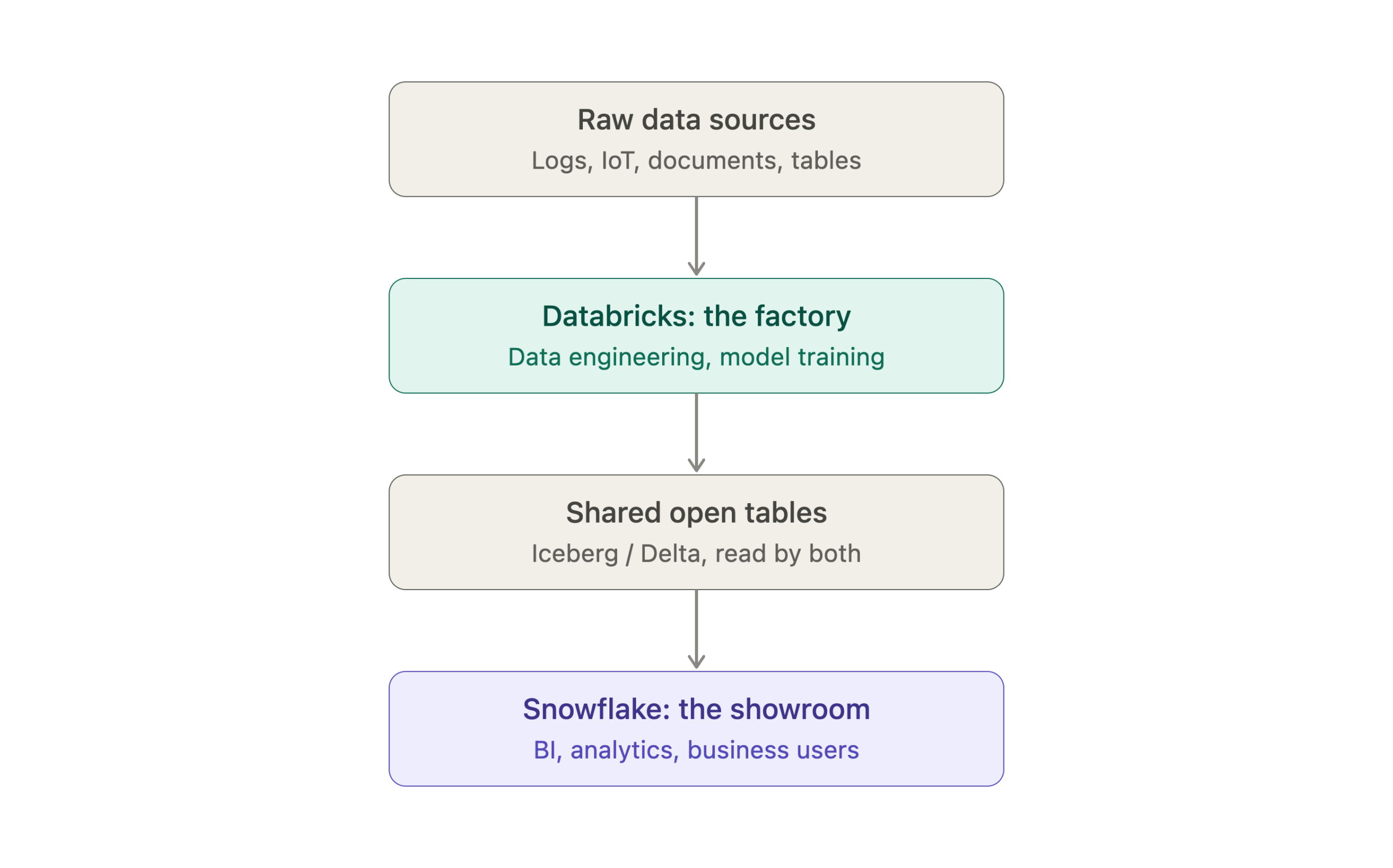
Often, yes. The hybrid pattern we implement most: Databricks handles data engineering and model training – the “factory” – and Snowflake serves that data to business users and analysts – the “showroom.”
With Iceberg support on both platforms now, this hybrid setup is materially easier to maintain than it was two years ago; both engines can increasingly read the same underlying tables.
Migration Complexity — Being Honest About It
SQL workloads move relatively cleanly between the two: Snowflake SQL and Databricks SQL are close enough that this layer is rarely the hard part. Spark pipelines have no direct Snowflake equivalent and need rebuilding.
ML workflows generally require full redevelopment rather than a lift-and-shift. Governance and security policies need re-architecture, not just re-configuration.
For a mid-size enterprise, we budget 6–18 months for a full migration, including pipelines, ML workflows, and governance.
A phased approach – putting new workloads on the target platform first, migrating legacy workloads later or not at all – is consistently lower-risk than a big-bang cutover.
Microsoft Fabric: The Third Option Nobody’s Comparison Covers
“Databricks vs Snowflake vs Fabric” is a growing search query, and for good reason – Microsoft Fabric has matured enough by 2026 that ignoring it makes a comparison feel incomplete.
Fabric is Microsoft’s unified analytics platform: a lakehouse (OneLake), data warehouse, data integration (Data Factory), Power BI, and AI capabilities bundled inside the Microsoft 365/Azure ecosystem.
For an organization already committed to Microsoft’s stack, the pitch is a single commercial relationship covering data, AI, and BI.
Who should seriously consider Fabric:
- Heavy Microsoft 365 / Azure shops with existing enterprise agreements
- Teams where Power BI is already the standard for reporting
- Organizations that want one vendor relationship covering data, AI, and BI rather than three
Where it currently lags:
- Custom ML/AI engineering is less mature than what Databricks offers
- Cross-cloud analytics is less mature than Snowflake’s multi-cloud story
- The integration story between OneLake, the warehouse, and Power BI is compelling on paper but still catching up in production
Our Honest Read
If your organization runs deeply on the Microsoft stack and your primary use case is BI and analytics with AI features layered on, Fabric deserves serious evaluation. If you’re building production ML systems or need genuine multi-cloud data sharing, Databricks and Snowflake remain the more mature choices in 2026.
Which Platform Should You Choose?
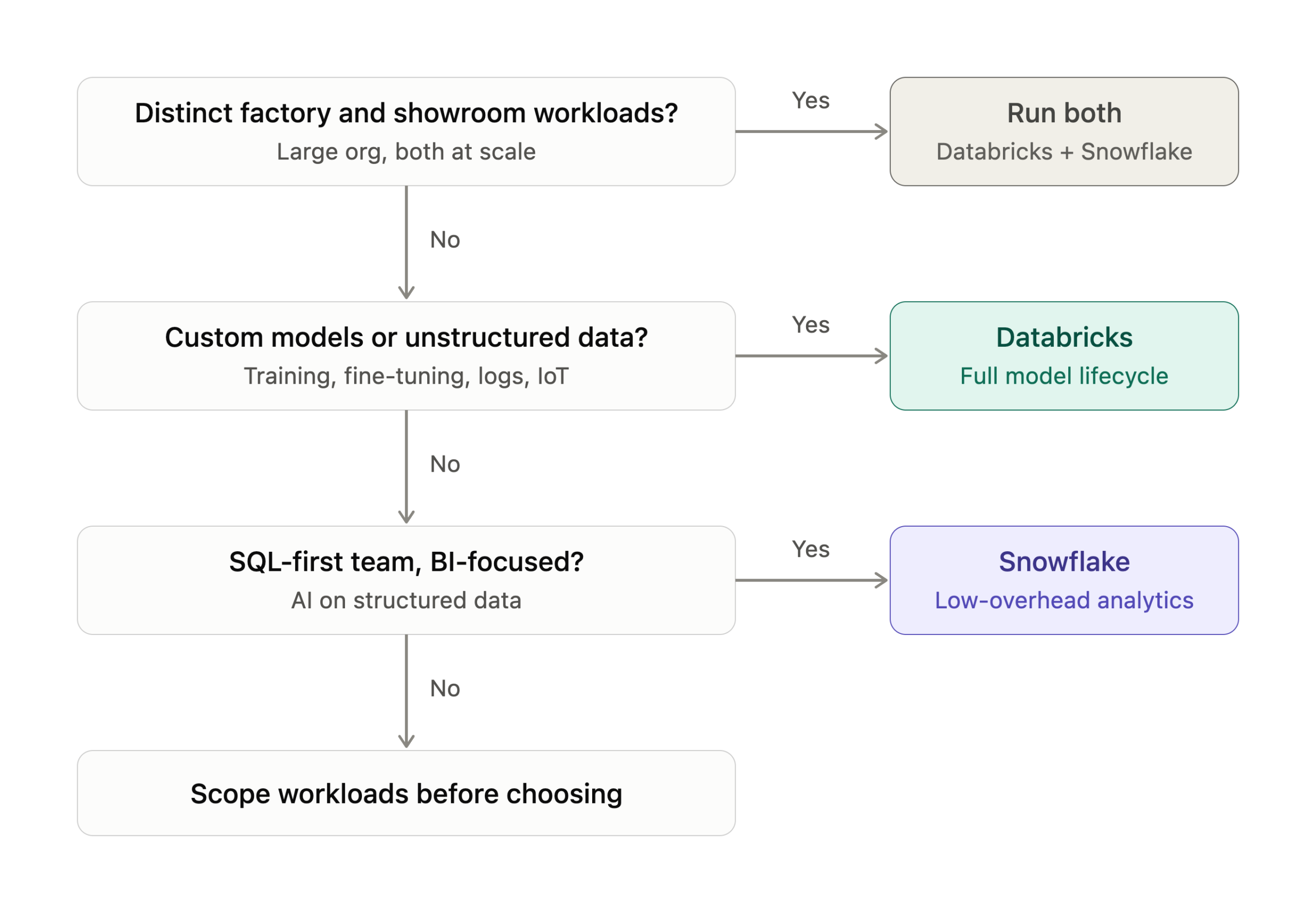
Choose Snowflake when:
- Your team is SQL-first and analytics/BI are the primary workloads
- Speed to value matters more than deep customization
- You’re in a regulated industry and want minimal operational overhead
- Your AI use case is “chat with your data” or RAG on existing structured data
Choose Databricks when:
- Custom ML model training is a core requirement, not a nice-to-have
- You’re processing petabytes of unstructured data
- Your team includes strong Python/Spark engineers
- AI is a product feature you’re building, not an analytics capability you’re consuming
- You need end-to-end MLOps with full model lifecycle governance
Consider running both when:
- Your organization is large enough to justify operating two platforms
- You have genuinely distinct “factory” (processing, training) and “showroom” (BI, reporting) workloads
- Open table formats make the data layer interoperable enough that running both isn’t a maintenance nightmare
Decision Checklist
Choose Databricks If You Check 3 or More
- Your team writes Python or Scala regularly
- You need to train or fine-tune ML models on proprietary data
- You process large volumes of unstructured data — logs, IoT, documents, images
- Real-time streaming is a core requirement
- You’re building AI-native product features, not just analytics
- You have dedicated data engineering talent, or plan to hire it
- You prioritize data portability and open formats over convenience
Choose Snowflake If You Check 3 or More
- Your team primarily works in SQL
- Your primary output is business dashboards, reports, and analytics
- You need minimal infrastructure management overhead
- You want to apply GenAI to existing structured data quickly
- You operate in a highly regulated industry with strict governance needs
- Speed to first production result matters more than long-term flexibility
- You’re consolidating data sharing across multiple business units or external partners